openntc
31 Aug 2026Compressing textures by 95%+ with minimal loss of quality
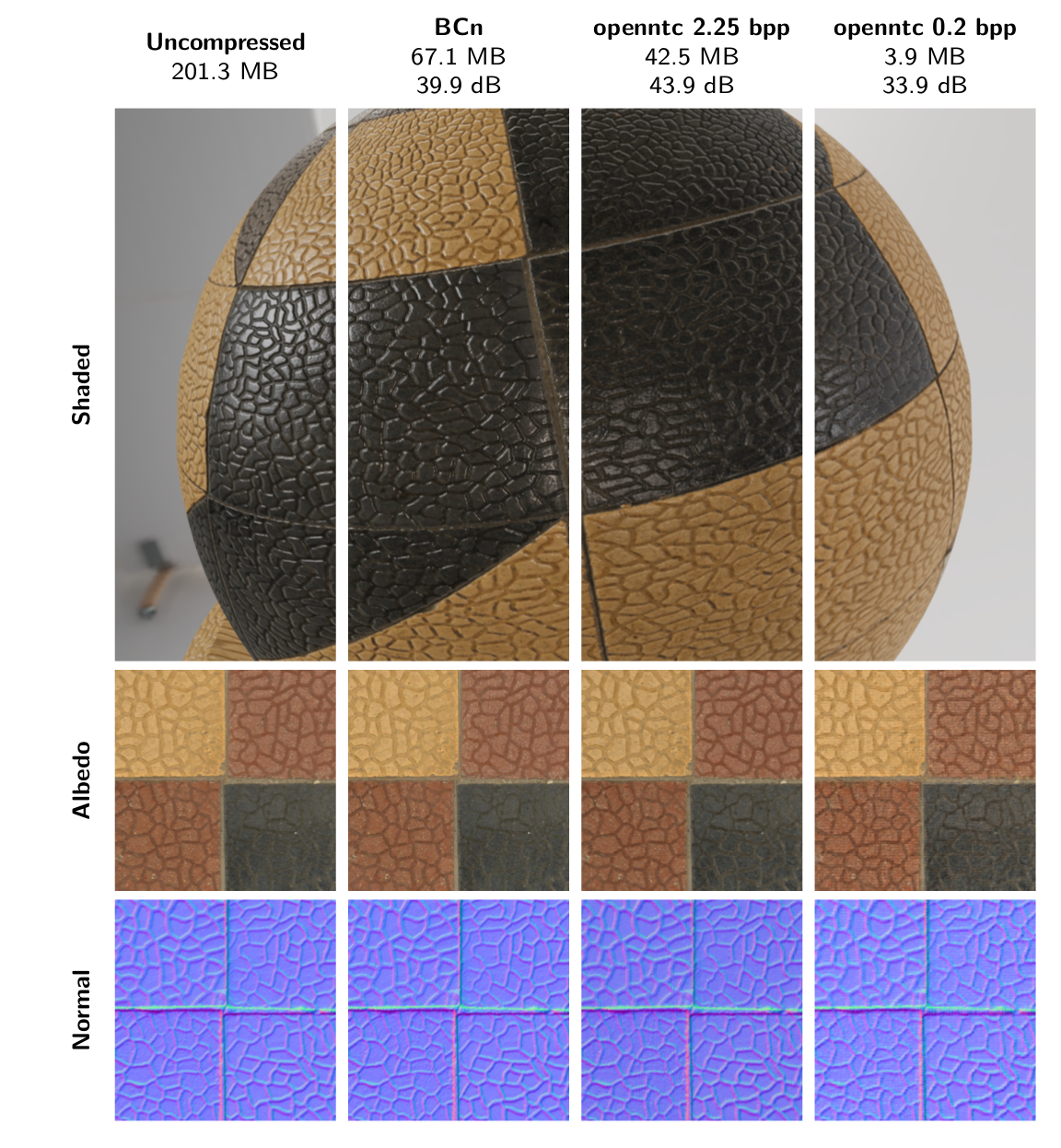
In every major modern video game and engine, large sets of textures are used to drive rendering materials. Physically Based Rendering (PBR) materials can be defined by half a dozen or more high resolution textures defining properties like Albedo, Specular, Ambient Occlusion, etc. This means that a single material type may take up hundreds of MB at higher resolutions. In a world where games can contain tens of thousands of unique materials and VRAM is at an absolute premium, this is unviable. To overcome this game engines employ multiple methods; Typically, at least by applying BCn compression to the textures. BCn compression has the benefit of wide hardware support and efficient decode times, but are fixed to certain per-texture compression schemes with conservative compression factors [16]. Recent hardware and API changes have enabled more powerful compression algorithms, ones that take every channel in a PBR material into consideration [1][3][4][5].
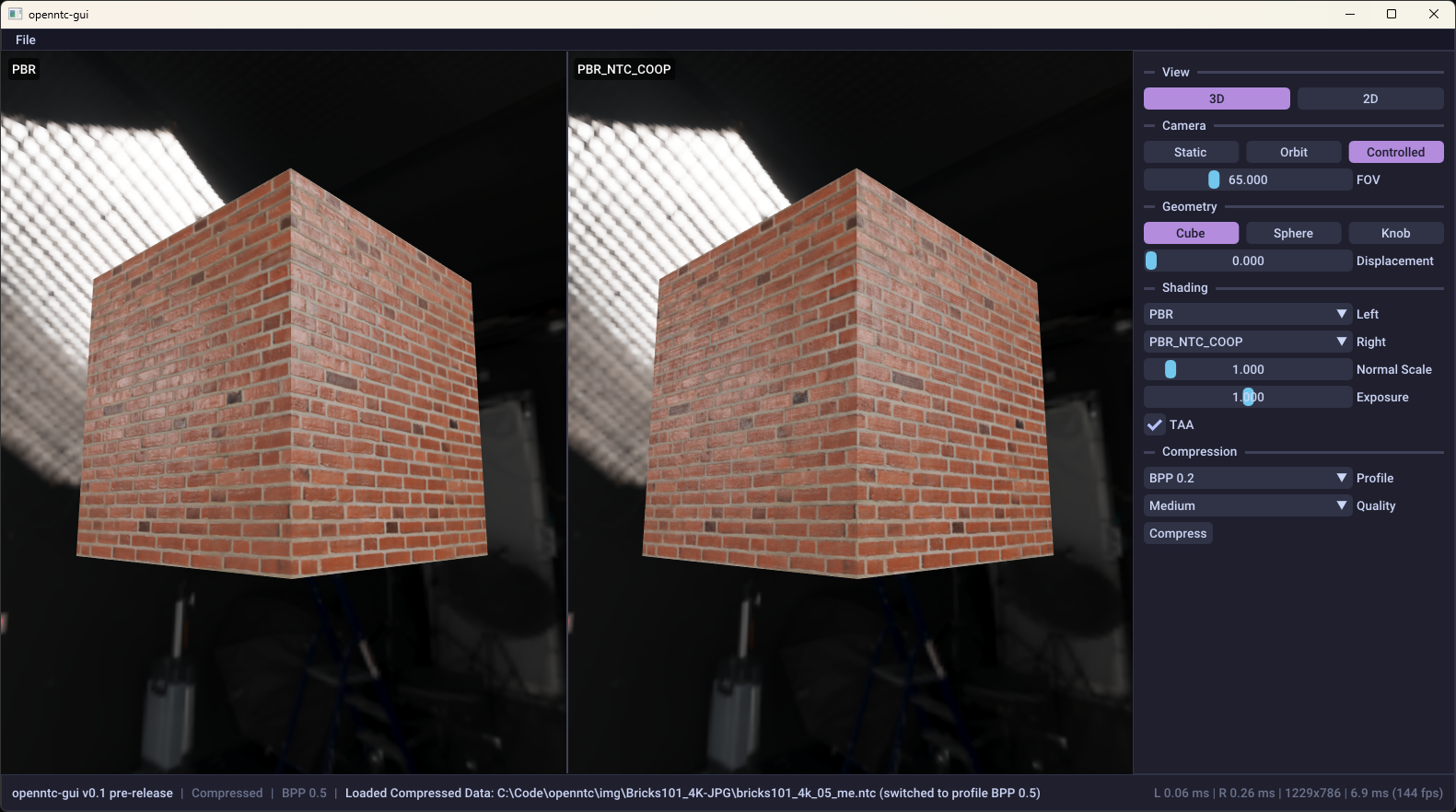
We’ll walk through a new compression method in this article: Neural Texture Compression (NTC) [1] which is able to compress entire texture sets by 95%+ vs uncompressed and deliver substantially higher quality than BCn at lower bitrates. We’ll do this through the development of openntc, a source-available implementation of NTC from scratch that provides both API and GUI interfaces to its own compression utilities. We’ll go through a quick guide on how to use the library before discussing details. We’ll present the major ideas, then we’ll walk through an implementation from scratch. Finally, we’ll examine performance both at a per-material scale and in a more realistic game setting.
Table of Contents
openntc: Quick start and User guide
Here’s a quick guide to testing out our implementation of NTC tools on your own textures:
- Grab a copy of the latest release here. Currently, we support Windows/CUDA machines for compression, and DirectX 12 for the runtime (decoding).
-
Create a description of your material using a JSON manifest. The format generally matches those of other NTC tools [2]:
{ "width": 4096, "height": 4096, "textures": [ { "fileName": "BaseColor.png", "isSRGB": true, "semantics": { "Albedo": "RGB" } }, { "fileName": "Normal.png", "semantics": { "Normal": "RGB" } }, { "fileName": "RoughnessMetalness.png", "semantics": { "Roughness": "G", "Metallic": "B" } }, { "fileName": "AmbientOcclusion.png", "semantics": { "Occlusion": "R" } } ] } -
Select a profile in the GUI. Each profile has a different compression scheme, each with different bytes-per-pixel channel and quality values. Here are example results on a 9-channel, 4096 x 4096 PBR texture set at openntc’s Ultra preset. Note that the uncompressed size of this texture set is 201.3 MB.
openntc 0.2 bpp openntc 0.5 bpp openntc 1.0 bpp openntc 2.25 bpp Size 3.93 MB 9.52 MB 19.0 MB 42.5 MB Quality (PSNR) 33.91 dB 36.66 dB 40.25 dB 43.87 dB - Select a training quality and hit train, progress is viewable via the training bar.
- Compare reconstruction quality with the original by choosing one of the NTC options in the view panels, then Save Compressed via Ctrl-S.
-
Alternatively, we can use the libopenntc API via C++ as follows:
#include <libopenntc/libopenntc.h> ... using namespace openntc; Context ctx; ContextInitInfo init = { .profile_ = Profile::Bpp_0_5 }; if (ctx.Init(init) == Result::Success) { if (ctx.LoadManifest("manifest.json") == Result::Success) { TrainInfo train = { .quality_ = Quality::Medium, .grids_per_batch_ = 1 }; ctx.BeginTraining(train); ctx.TrainUntilComplete(); EvalResults eval = ctx.Eval(); std::cout << "PSNR: " << eval.psnr_ << " dB"; Dump("bricks.ntc", ctx.GetCompressedData()); } } -
To sample openntc-compressed textures in your own engine or project, use the openntc-runtime library to load buffers from the .ntc file. Bind these buffers as HLSL descriptors to your shader:
#include <libopenntc/openntc_runtime.h> ... openntc::FileData file; if (openntc::Load("bricks.ntc", file) != openntc::Result::Success) return; const openntc::CompressedData& cd = file.Data(); // Upload data to GPU, CreateBufferWithData is a placeholder helper function // SRV: Buffer<uint>, Format: DXGI_FORMAT_R32_UINT ID3D12Resource* g0_buf = CreateBufferWithData(cd.g0_[0], cd.g0_total_size_); // SRV: Buffer<uint>, Format: DXGI_FORMAT_R32_UINT ID3D12Resource* g1_buf = CreateBufferWithData(cd.g1_[0], cd.g1_total_size_); // SRV: ByteAddressBuffer, Format: DXGI_FORMAT_R32_TYPELESS ID3D12Resource* dec_buf = CreateBufferWithData(cd.decoder_, cd.decoder_size_); // Constant buffer with texture-related information openntc::NTCConstants consts; openntc::FillNTCConstants(cd, consts); ID3D12Resource* ntc_cb = CreateBufferWithData(&consts, sizeof(consts)); -
Include the ntc_decode.hlsli HLSL header and call our helper functions to retrieve your sample!
#define BPP_0_5
#include "ntc_decode.hlsli"

ConstantBuffer<NTC> NTCCBV : register(b1);   // NTCConstants from FillNTCConstants
Buffer<uint> g0 : register(t0);              // Feature pyramid 0
Buffer<uint> g1 : register(t1);              // Feature pyramid 1
ByteAddressBuffer decoder : register(t2);    // Decoder MLP weights

...

openntc::MaterialParams mat = openntc::SampleMaterial(g0, g1, decoder, NTCCBV, uv, lod);

// Now use material params mat.albedo_, mat.roughness_, etc. to perform lighting.
Let’s now go deeper into how this all works:
Feature Pyramids
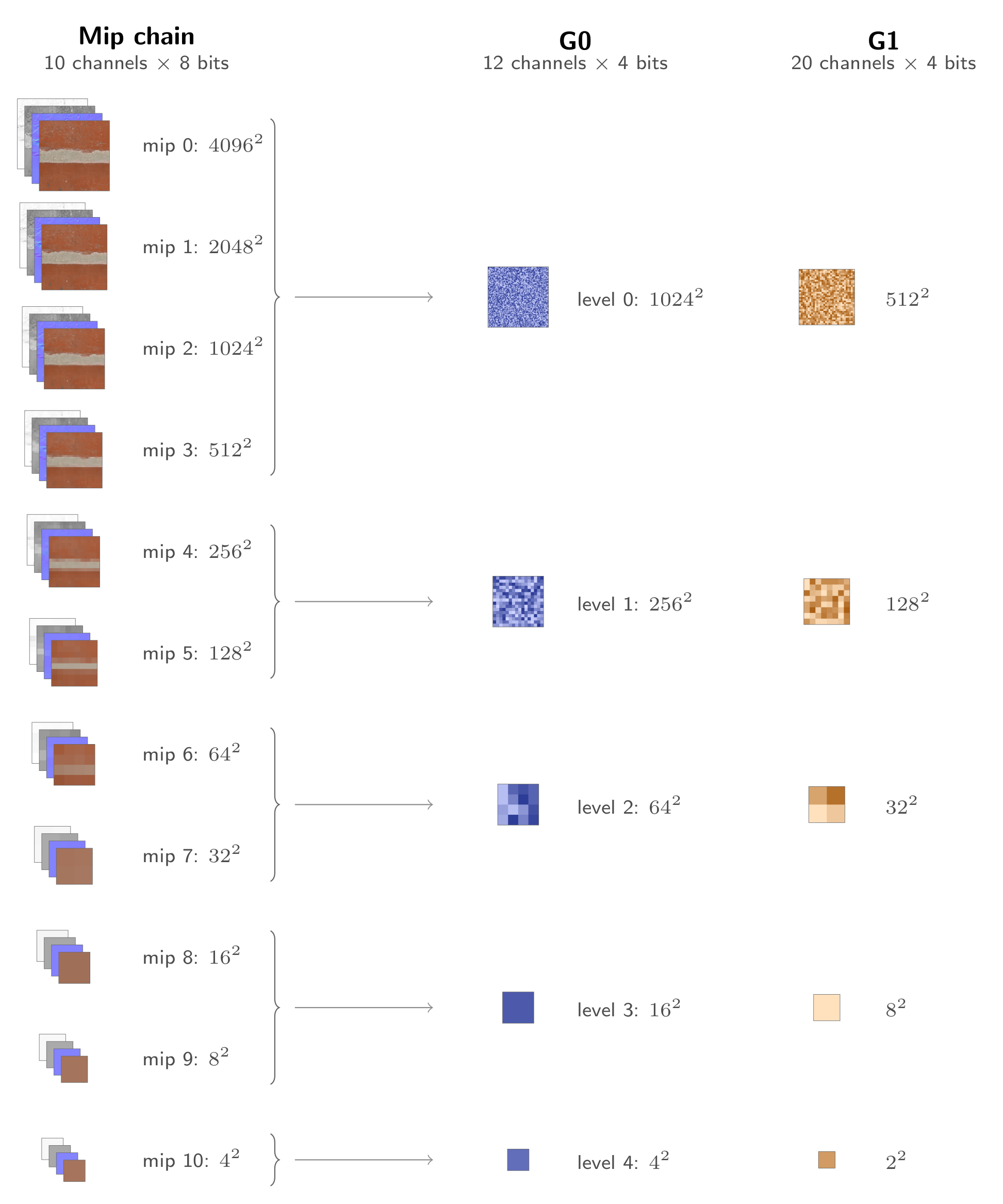
We can think of a uncompressed 2D texture as a grid where each cell of the grid contains up to 4 channels or features and each channel takes up a number of bits, typically 8/16/32 depending on the texture format. In a game engine, downsampled versions of the full resolution texture are also used when distances between sample locations are larger. This forms a mip chain, which can resemble a pyramid of grids of features.
Neural compressed textures generalize this, where we have a pyramid of features, except each cell of each grid may have an arbitrary number of features each with an arbitrary number of bits. Instead of each cell containing actual texture data directly, they contain input features to a decoder, typically a small MLP. Instead of each mip representing a single LOD for one channel of a material, each level of a feature pyramid represents all of the channels for multiple LODs of a material. The compression ratio can be tweaked by changing of the number of bits per feature and features per cell.
Decoding
Decoding NTC textures can be done prior to their use in a shader, essentially creating an uncompressed version of the textures before sampling (Inference-on-Load), or in real-time as they are being sampled (Inference-on-Sample). Inference-on-Load can be followed by compressing the textures to BCn, which means we don’t actually get any VRAM savings for a NTC compressed texture at runtime over BCn, but this can still help with reducing download sizes and install footprints. A huge benefit of Inference-on-Load is that the graphics programmer doesn’t need to change his shaders or sampling behavior in any way. On the other hand, Inference-on-Sample allows us to only store the compressed NTC data at runtime. This means every sample requires a full inference step, which involves modifying shader code. This inference step is described below.
For openntc, similarly to RTXNTC [1], we use two separate feature pyramids. The first pyramid is higher resolution, and we draw four samples from it corresponding to the four closest cells to the sample location. The second feature pyramid uses a bilinear sample of the four nearest cells. This combination allows the network to learn its own filtering scheme for the first set of features. Since feature grids are coarser than the raw textures they compress, it is critical to provide additional positional information to distinguish between them. We supply triangle waves at multiple resolutions as a positional encoding [1]. Finally, a single normalized float provides LOD information.
These are input features fed into a simple neural network called a Multi-Layer Perceptron (MLP). Multiple decoder architectures have been proposed [1][3][4][5], for openntc I opted for a simple two layer network each with 64 neurons. This means that inference in the shader involves three matrix-vector multiplications, each separated by a non-linear activation function. The specific activation function we use is hardGELU, a piecewise approximation of GELU [11] which is relatively computationally efficient:
float hardgelu(float x)
{
  return x < -1.5 ? 0.0 : (x < 1.5 ? x * (x + 1.5) / 3.0 : x);
}
Compression
This diagram breaks down how openntc works, using a set of uncompressed textures as input, using our 0.5 bits-per-pixel-channel profile as reference. A similar process works for the other profiles.
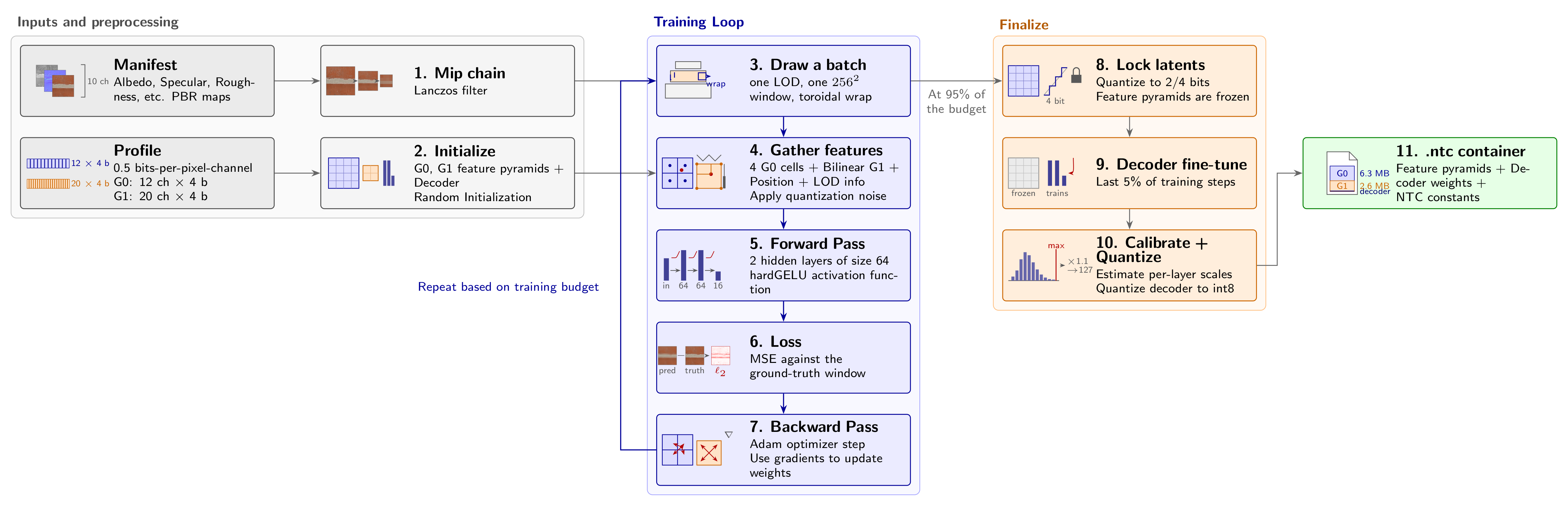
- First we generate any missing mips for the input textures using a high-quality edge preserving Lanczos filter [12].
- We choose a profile. Each profile has a different bits-per-pixel-per-channel number, mainly due to the number of features and bits-per-feature of the feature grids.
- For each training iteration, we draw an LOD at random and randomly sample a square grid from the mips corresponding to this LOD for each texture in the material. This forms our ground truth information for the current batch.
- We then draw features from matching positions in the untrained feature pyramids, as well as the positional and LOD information laid out in the previous section. Through training we use 32-bit floats to represent weights, however the compressed weights will have far lower bit widths (generally 2-4 bits). To make the model robust to this quantization, we add an amount of noise to the sampled feature pyramids proportionate to the final bit width [1].
- This forms a classic supervised learning pattern. We make a forward pass of the input features through the network to obtain the models prediction of the input at this time.
- These predictions can be compared against the ground truth using the mean-squared error loss function. (L2 Loss)
- We then backpropagate this loss through the network, updating decoder weights and feature pyramids to minimize the loss between predictions and ground truth.
- Finally we lock the feature grid weights to their final quantized values, rounding to the nearest quantization bin matching the selected profile.
- We let the decoder train for a short time longer (~5% of total training budget) at the settled grid weights.
- The finished compressed feature grids are packed tightly into their profile bit-widths and the decoder is then quantized to 8-bit integers for efficient DP4A/Cooperative Vector decoding. Since we need to requantize inputs after each layer we must also measure the absolute maximum output of each layer as a calibration step.
- The feature grids, decoder and certain NTC metadata specific to that material are distributed together as the final compressed texture.
Optimizing Inference
Running a forward pass multi-layer neural network for every pixel is extremely computationally intensive. Naive matrix multiplication on floats using sequential multiply and add instructions will be bound by loading weights. Inference-on-Sample models are especially incentivized to maximize performance in this area.
DP4A
Shader model 6.4 introduced Dot Product of 4 Elements and Accumulate (DP4A) instructions that are able to interpret a single 32-bit integer register as vector of 4 8-bit integers, and compute the dot product of two such vectors and storing the result in a single 32-bit integer, all in one instruction [6].
This was further supported by SM 6.6 (NVIDIA Pascal, AMD RDNA) which added helper functions to pack and clamp sets of integers into 8-bit slots of a single 32-bit integer [7]. This dramatically reduces the loads and instructions required, and brings the inference time into acceptable territory. Since matrix-vector multiplication involves taking the dot products of each row of the matrix with the vector, its a natural fit.
// Matrix multiplication using DP4A

// input and output are HIDDEN_DIM-element vectors with each 4 consecutive
//  8-bit elements packed into 32-bit uints
uint input[HIDDEN_DIM / 4];
uint output[HIDDEN_DIM / 4];

// Evaluate 4 rows at a time
for (int i = 0; i < HIDDEN_DIM; i += 4)
{
  int4 acc = int4(0, 0, 0, 0);
  [unroll]
  for (int j = 0; j < HIDDEN_DIM / 4; j += 4)
  {
    // MatrixLoad4: Placeholder to load 4x4 contiguous weights starting from column j in row i
    // Each row is also packed into 8-bits, meaning a uint4 contains 16 values.

    uint4 Wx = MatrixLoad4(i, j * 4);
    uint4 Wy = MatrixLoad4(i + 1, j * 4);
    uint4 Wz = MatrixLoad4(i + 2, j * 4);
    uint4 Ww = MatrixLoad4(i + 3, j * 4);
    [unroll]
    for (int c = 0; c < 4; c++)
    {
      // Requires Shader Model 6.4
      acc.x = dot4add_i8packed(Wx[c], input[j + c], acc.x);
      acc.y = dot4add_i8packed(Wy[c], input[j + c], acc.y);
      acc.z = dot4add_i8packed(Wz[c], input[j + c], acc.z);
      acc.w = dot4add_i8packed(Ww[c], input[j + c], acc.w);
    }
  }
  // When repacking into 8-bits, we need to provide scaling factors from the Calibration step
  //  to ensure best use of bits available. ScalingForRows is the factor for rows [i, i+3]
  float4 facc = float4(acc) * ScalingForRows(i);
  facc = hardGELU(facc) * ScalingForActivation();
  int4 unpacked = int4(round(facc));
  // Requires Shader Model 6.6
  output[i / 4] = pack_clamp_s8(unpacked);
}
Cooperative Vectors
The real benefit, however, comes with cooperative vector support. This refers to hardware-accelerated matrix multiplication using NVIDIA’s tensor cores and AMD’s matrix cores. The API for this hasn’t settled yet. DirectX 12 proposed a version of this called cooperative vectors in Shader Model 6.9 [8], then reworked it into a more general linear algebra library for Shader Model 6.10 [9]. At the time of writing, its still in preview, requiring beta drivers and a preview Agility SDK. As we’ll see in the performance section, however, this is by far the most performant approach since it executes all loads and and matrix-vector multiplications for a single warp in one step.
// Matrix multiplication using cooperative vectors
// Requires Shader Model 6.10
#include <dx/linalg.h>
using namespace dx::linalg;

// input and output are HIDDEN_DIM-element vectors with each 4 consecutive
//  8-bit elements packed into 32-bit uints
vector<uint, HIDDEN_DIM / 4> input;
vector<uint, HIDDEN_DIM / 4> output;

typedef Matrix<ComponentType::I8, HIDDEN_DIM, HIDDEN_DIM, MatrixUse::A, MatrixScope::Thread> W_t;
W_t W = W_t::Load<MatrixLayout::RowMajor>(decoder, MATRIX_OFFSET, /*row stride*/ HIDDEN_DIM);

// Tell the unit to read the packed uints as int8
InterpretedVector<uint, HIDDEN_DIM / 4, ComponentType::I8> x = MakeInterpretedVector<ComponentType::I8>(input);
vector<int32_t, HIDDEN_DIM> acc = MultiplyAdd<int32_t>(W, x, (vector<int32_t, HIDDEN_DIM>)0);

// When repacking into 8-bits, we need to provide scaling factors from the Calibration step
//  to ensure best use of bits available. ScalingForRows is the factor for all HIDDEN_DIM rows
vector<float, HIDDEN_DIM> facc = vector<float, HIDDEN_DIM>(acc) * ScalingForRows();
facc = hardGELU(facc) * ScalingForActivation();
vector<int32_t, HIDDEN_DIM> unpacked = vector<int32_t, HIDDEN_DIM>(round(facc));
[unroll]
for (int i = 0; i < HIDDEN_DIM; i += 4)
{
  // Requires Shader Model 6.6
  output[i / 4] = pack_clamp_s8(int4(unpacked[i], unpacked[i + 1], unpacked[i + 2], unpacked[i + 3]));
}
Optimizing Compression
While deep-learning frameworks like pytorch were helpful for the initial research/proof-of-concept period, I quickly grew tired of the longer iteration times for experiments and needed a faster approach. Switching to hand-written CUDA kernels offered tremendous speed-up oppurtunities:
- Training involved dozens of hundreds of small operations per step with significant torch/python overhead and many intermediate tensors. Rolling our own allows us to be explicit about which operations map to a single kernal invocation, and eliminate dynamic memory allocation along the critical path.
- Using CUBLAS for the large matrix multiplication operations involved in forward and backward passes over the network, allows us to benefit from hardware-accelerated tensor cores when available.
- Because we train on contiguous grids of the input textures, the backward pass over feature pyramids updates the same features multiple times. Practically, this means we need atomic updates which increases compression time based on contention. We can exploit the fact that threads in the same warp are likely to share features (due to the way features are drawn, see the section on decoding). We can use warp-level synchronization [10] to reduce contention as follows:
__device__ void mask_aggregate_atomic_increment(float* grid_grad, int cell, float val)
{
  // Lanes in this warp (among the active ones) whose cell equals mine
  unsigned peers = __match_any_sync(__activemask(), cell);
  int lane = threadIdx.x % 32;
  int leader = __ffs(peers) - 1;          // lowest peer lane does the write

  // Pull each other peer's value with a shuffle
  float total = val;
  unsigned others = peers & ~(1u << lane);
  while (others)
  {
    int next = __ffs(others) - 1;
    total += __shfl_sync(peers, val, next);
    others &= ~(1u << next);
  }

  if (lane == leader)
    atomicAdd(&grid_grad[cell], total);
}
Sampling & Filtering
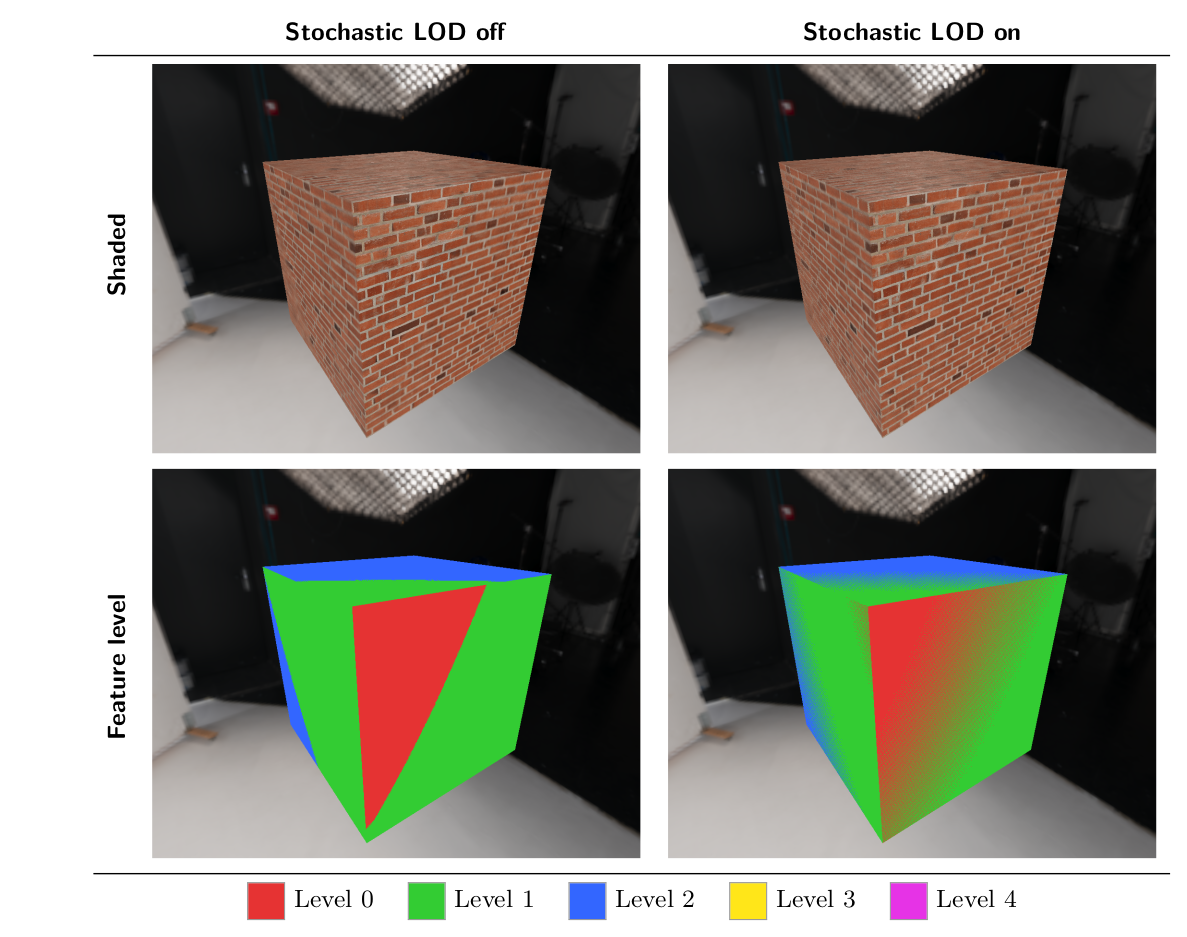
Since decoding neural compressed textures must be done in shader code vs. hardware support for BCn textures, we must take special care for how they are filtered. Moreover, since decoding a single sample is computationally expensive, taking multiple samples for trilinear or anisotropic sampling is unviable. We use stochastic filtering instead [1][13]. Here’s an example of how that works with trilinear sampling. Lets say we need to sample lod 2.4. In conventional hardware filtering, the sampler takes two bilinear samples at LOD 2 and 3, then lerps between them with parameter 0.4. For stochastic filtering, instead we just randomly sample a single LOD: we sample LOD 2 with probability 0.6, and LOD 3 with probability 0.4. Similarly for bilinear sampling, we can individually select an integral texel position based on the fractional value of the sample location.
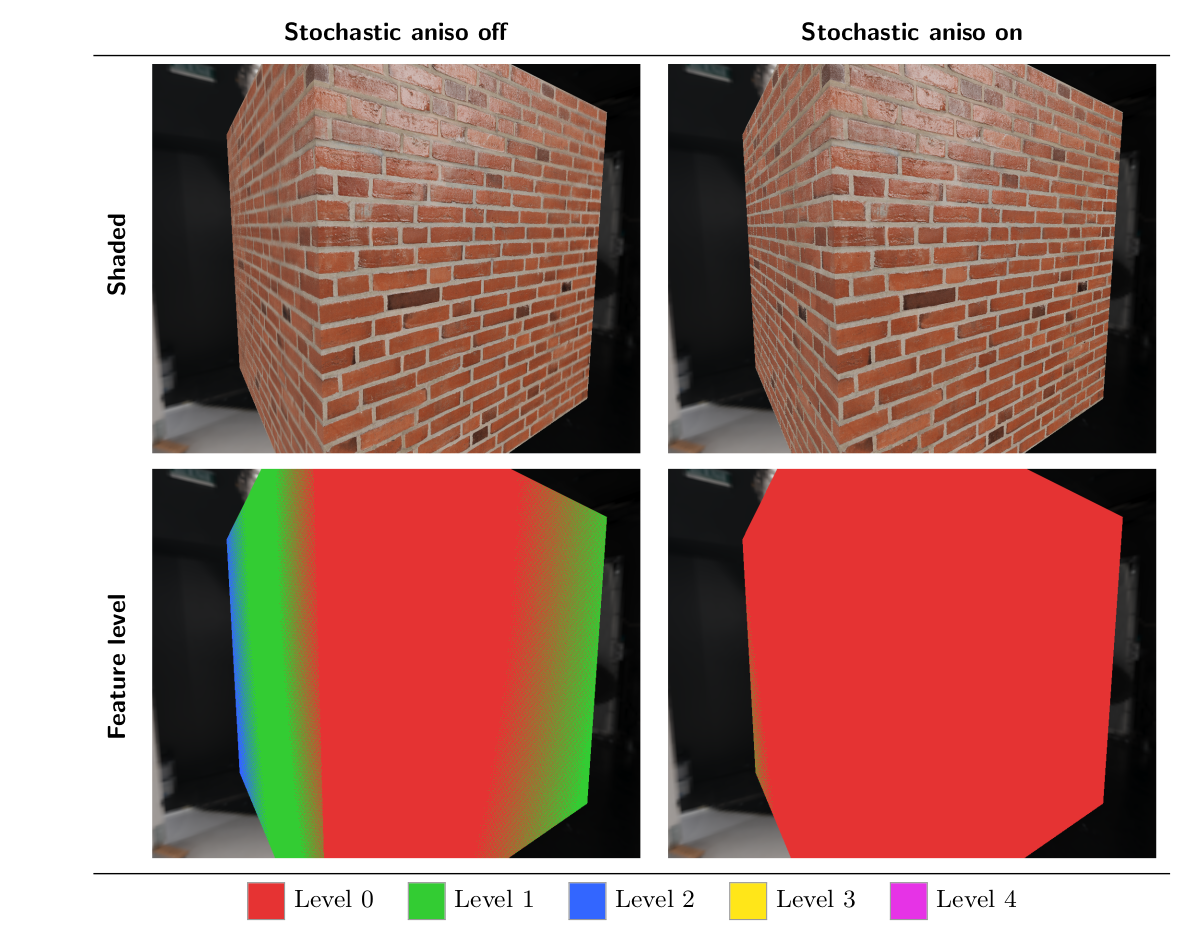
Anisotropic filtering is trickier. We can think of the uv space spanned by a single sample to have two axes, measured by taking the derivatives along the x and y axis of the quad. At grazing angles, the uv space spanned along one axis (major axis) may be much larger than a perpendicular axis (minor axis). We use the minor axis for LOD selection, then take a sample at random along the major axis.
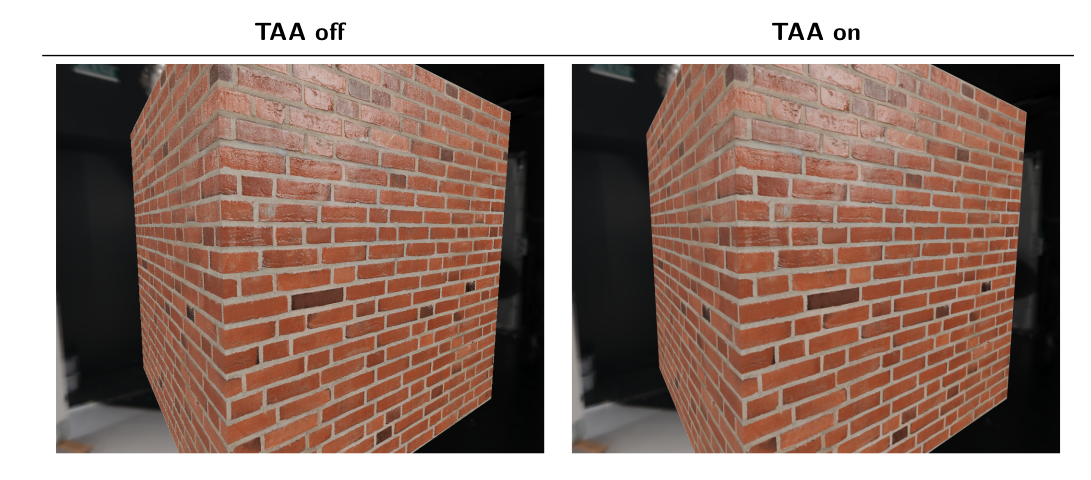
Making use of stochastic filtering means that some sort of temporal accumulation is necessary to avoid jittering. This is less of a drawback now that TAA is the most common form of anti-aliasing, but is worth mentioning. We use a simple TAA implementation with color clamping, more details here [14]
Performance
Analyzing performance of openntc requires being aware of the different axes along which members can be compared. There is the actual space the compressed texture takes on disk, the quality of the texture after decompression and the performance cost of the decoding process of the texture. These experiments were conducted on the public domain ambientCG PBR material set [17] at 4096x4096 resolution. We will compare them both against the uncompressed data and BCn compressed textures. Since there are many possible schemes to encode each texture using Block Compression, we use a reasonable batch of settings that resembles Unreal Engine 5’s default encoding scheme [19]. We use the open-source texconv package [15] to perform BCn compression.
| Format | Texture Layout Description |
|---|---|
| Uncompressed | Albedo R8G8B8 (3), Normal R8G8B8 (3), AO / Rough / Disp R8 (1 each) |
| BCn | UE5 defaults* [19]: Albedo BC1 (0.5), Normal BC5 (1), AO / Rough / Disp BC4 (0.5 each) |
| openntc 2.25 bpp | G0 16 ch x 4 b at 2048², G1 12 ch x 4 b at 1024², 5 levels |
| openntc 1.0 bpp | G0 12 ch x 2 b at 2048², G1 10 ch x 4 b at 1024², 5 levels |
| openntc 0.5 bpp | G0 12 ch x 4 b at 1024², G1 20 ch x 4 b at 512², 5 levels |
| openntc 0.2 bpp | G0 8 ch x 2 b at 1024², G1 12 ch x 4 b at 512², 5 levels |
*Single channel maps typically use the ‘Alpha’ setting in UE5, which uses BC4.
Size
This refers to the size of the textures on disk and in VRAM for the Inference-on-Sample path. Smaller values are better.
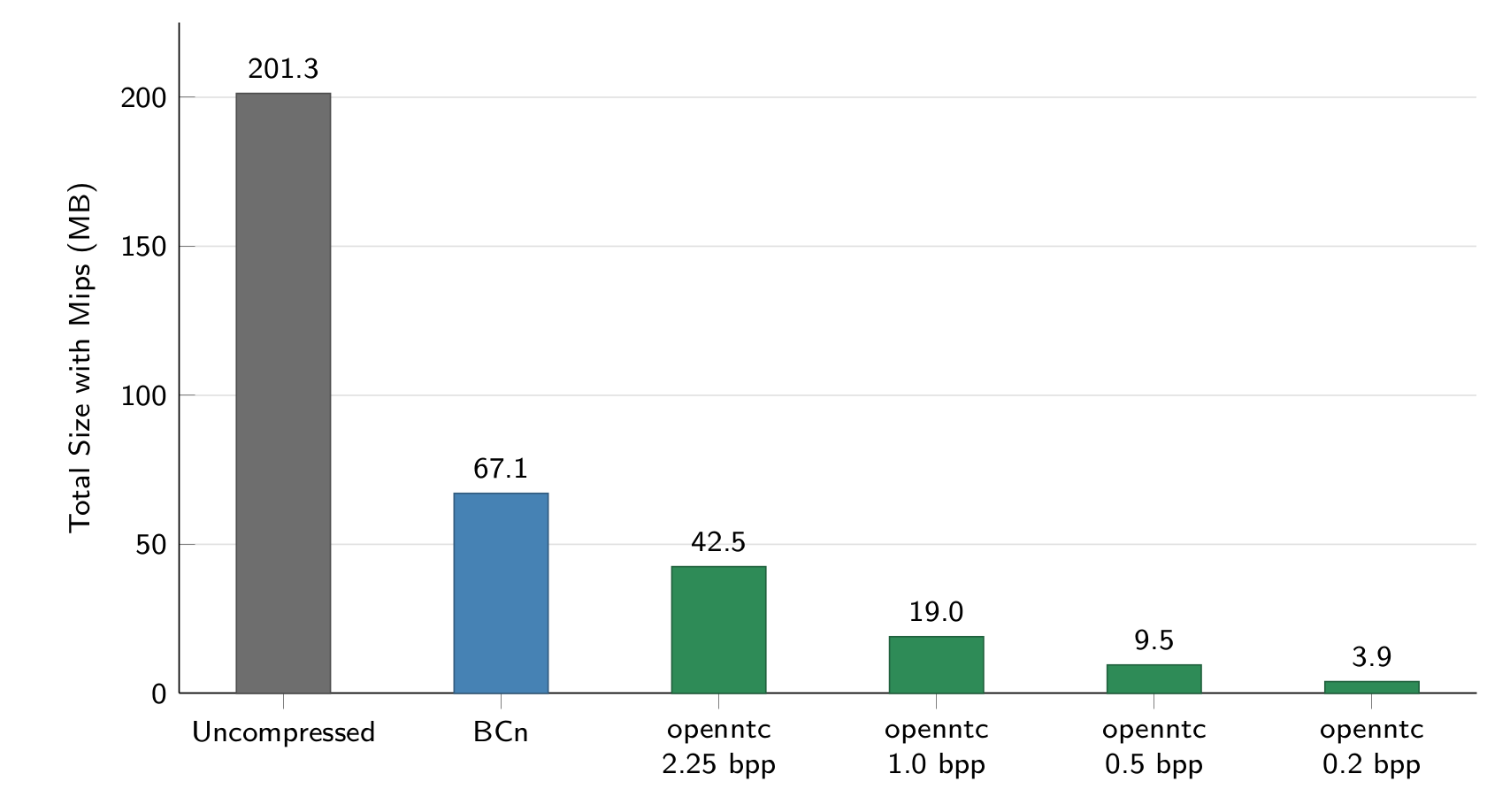
| Format | Size with Mips (MB) | Compression ratio vs uncompressed | Compression ratio vs BCn |
|---|---|---|---|
| Uncompressed | 201.3 MB | 1:1 | 1:3 |
| BCn | 67.1 MB | 3:1 | 1:1 |
| openntc 2.25 bpp | 42.5 MB | 4.7:1 | 1.6:1 |
| openntc 1.0 bpp | 19.0 MB | 10.6:1 | 3.5:1 |
| openntc 0.5 bpp | 9.52 MB | 21:1 | 7:1 |
| openntc 0.2 bpp | 3.93 MB | 51:1 | 17:1 |
Quality
Quality is measured by Peak Signal-to-Noise Ratio. (PSNR), where higher values are better:
\[\mathrm{PSNR} = 10 \log_{10} \frac{\mathrm{MAX}^2}{\mathrm{MSE}} = -10 \log_{10} \mathrm{MSE}, \qquad \mathrm{MSE} = \frac{1}{N} \sum_{i=1}^{N} \left( x_i - \hat{x}_i \right)^2\]where $x_i$ are the ground truth 8-bit texel values scaled to $[0, 1]$, $\hat{x}_i$ are the decoded compressed values. Since the magnitude of PSNR can vary widely based on the source image, and the relevant quantity is just the relative PSNR between presets we present the values for a single material from the ambientCG PBR set, Tiles131. The same material is used for our header image in the introduction.
We can adjust the number of training loop steps to generate quality presets. For openntc, we use Low (30k), Medium (120k), High (240k) and Ultra (480k) to offer different compression time vs. quality tradeoffs.
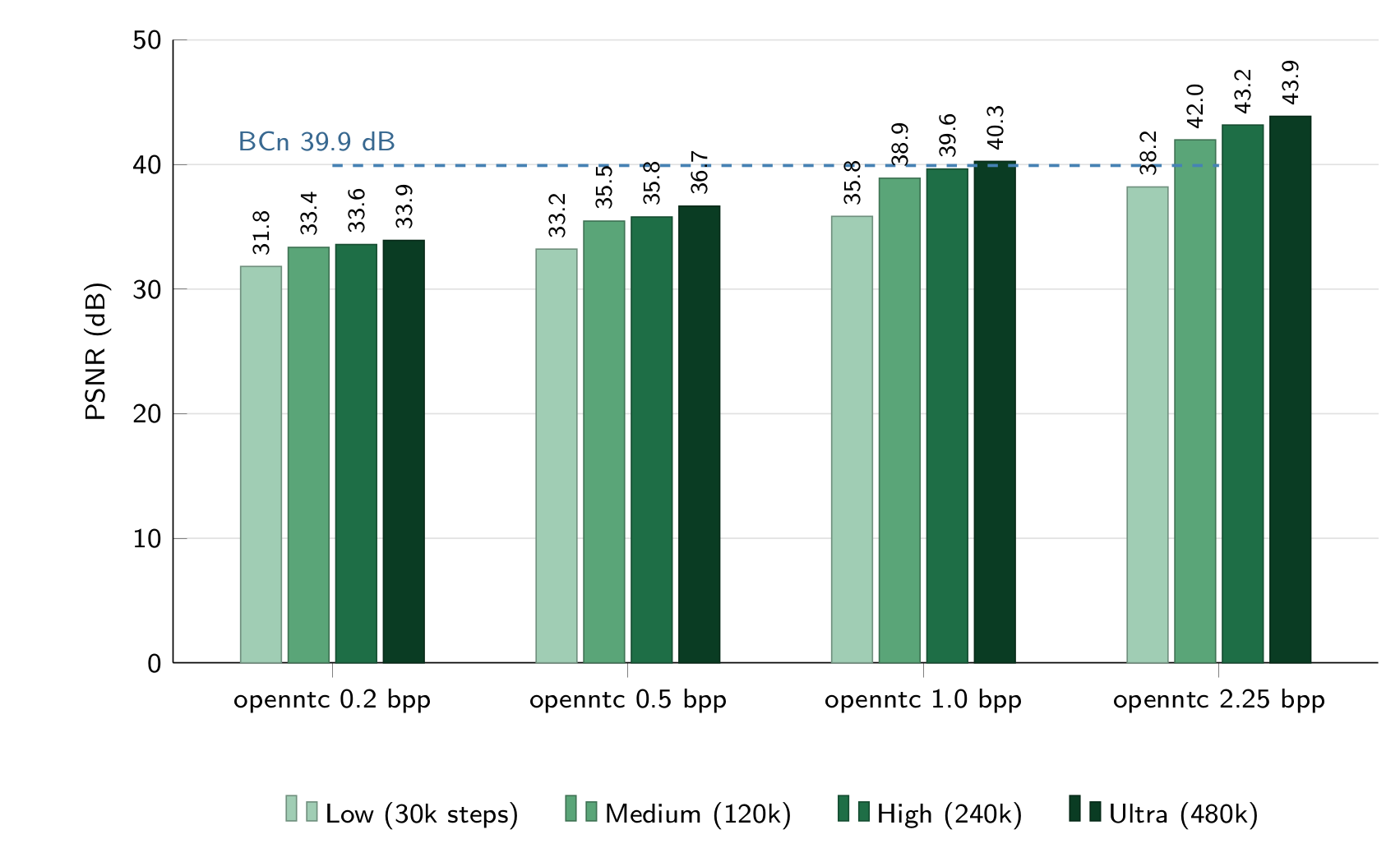
| Tiles131 (4096²) | Low (30k) | Medium (120k) | High (240k) | Ultra (480k) |
|---|---|---|---|---|
| BCn | 39.92 dB | 39.92 dB | 39.92 dB | 39.92 dB |
| openntc 0.2 bpp | 31.82 dB | 33.35 dB | 33.58 dB | 33.91 dB |
| openntc 0.5 bpp | 33.21 dB | 35.46 dB | 35.79 dB | 36.66 dB |
| openntc 1.0 bpp | 35.84 dB | 38.90 dB | 39.64 dB | 40.25 dB |
| openntc 2.25 bpp | 38.20 dB | 41.98 dB | 43.17 dB | 43.87 dB |
Decoding speed
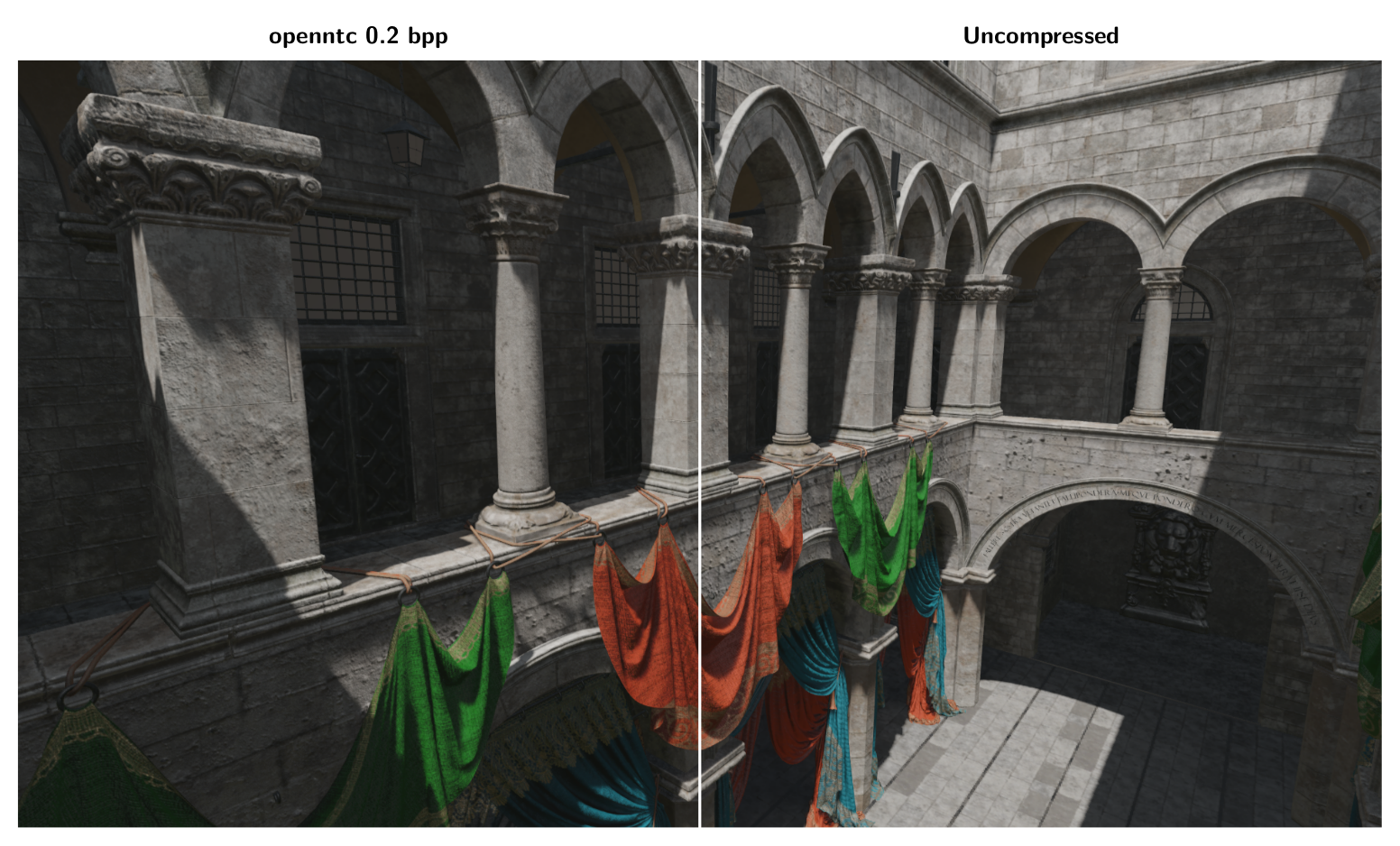
Finally, heres a full scene rendered entirely with openntc materials, the famous Sponza test scene [18]. This is a very simple deferred renderer with relatively simple lighting that is intended solely to measure the change in the performance of texture samples during the G-buffer write. All source materials use 4k texture sizes.
Since texture sampling performance is the main source of performance increase, writing out the (UV, LOD, Material) index to an intermediate buffer and then sample NTC materials to form the G-buffer, similar to deferred texturing. Since NTC converts entire materials to a single sample, ideally we want just one sample per-pixel which can be achieved this way.
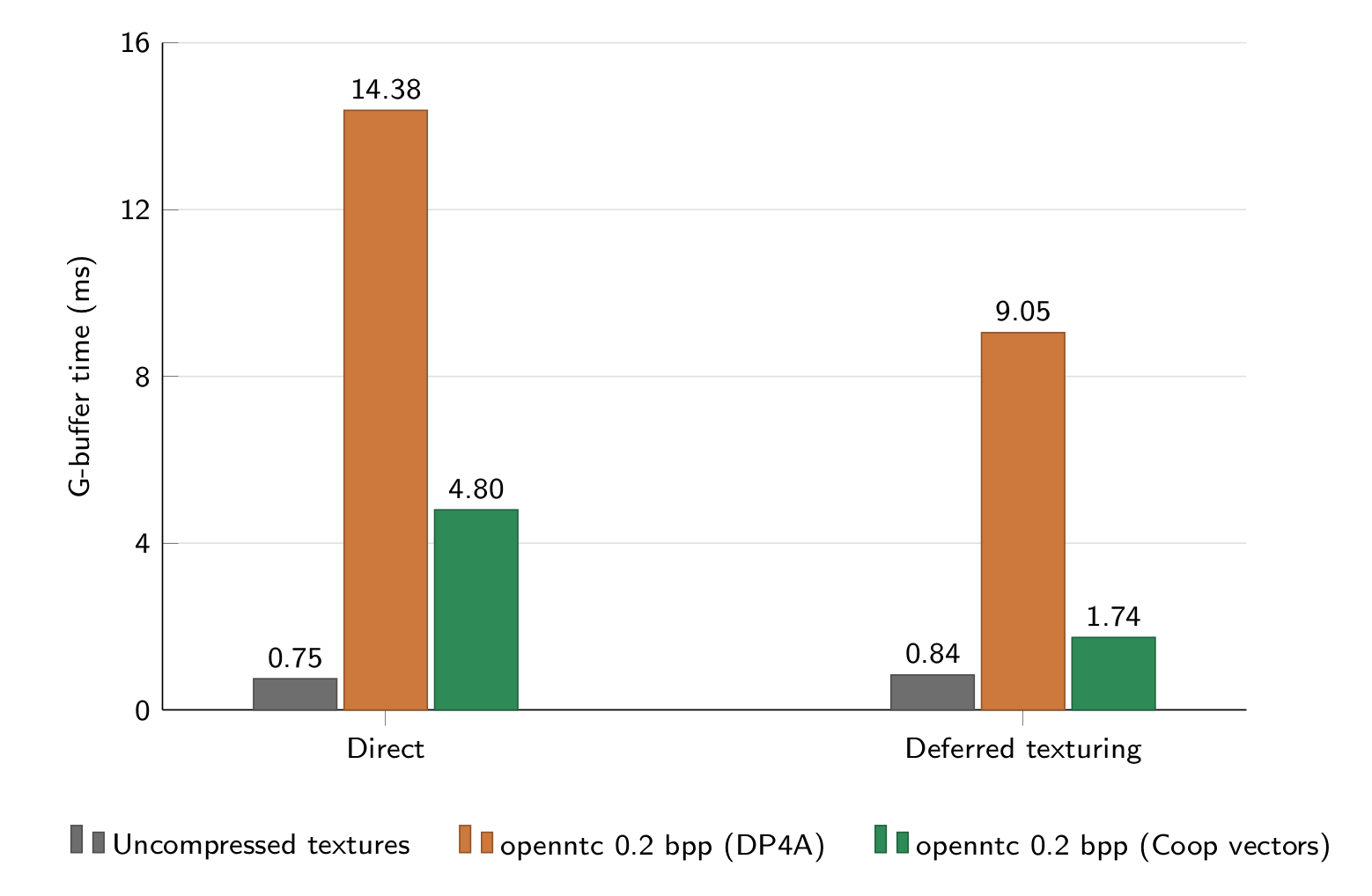
For a full scene, at 1080p, the cooperative vector path is the only realistic Inference-on-Sample path at frame rates acceptable to a game engine. Here is the full table of render timings for comparison.
| Material path | Direct, DP4A | Direct, Coop | Deferred texturing, DP4A | Deferred texturing, Coop | Deferred texturing, Coop + wave partition |
|---|---|---|---|---|---|
| Uncompressed textures (hardware filtering) | 0.75 ms | – | 0.84 ms | – | – |
| NTC 0.2 bpp | 14.38 ms | 4.80 ms | 9.05 ms | 1.74 ms | 2.00 ms |
| NTC 0.5 bpp | 16.81 ms | 5.17 ms | 10.20 ms | 1.91 ms | 2.20 ms |
| NTC 1.0 bpp | 15.10 ms | 5.02 ms | 9.58 ms | 1.89 ms | 2.12 ms |
| NTC 2.25 bpp | 17.42 ms | 5.02 ms | 10.64 ms | 1.93 ms | 2.17 ms |
All times refer to G-buffer generation times on an RTX 4080 at 1080p. Deferred texturing times include both the uv-pass and material sampling step.
Tips and Tricks
While reference material [1][2] was very helpful for this project, there are several things to keep in mind when using or implementing your own Neural Texture Compression engine that were not obvious to me:
Training distribution
When comparing reconstruction quality of a NTC scheme against other implementations, ensure that your measured PSNR numbers are as close to an apples-to-apples comparison as possible. If you are weighting PSNR on the higher resolution mips more heavily, you should be providing more training samples from the high resolution LODs. One of the trickiest bugs I resolved took place because during training I was drawing grids from each mip level such that the grid never overlapped the boundary. This had the subtle effect of reducing reconstruction quality at the edges of each texture, which was most noticable at lower resolution mips.
Multiple materials
Cooperative Vectors are built to exploit wave-level cooperation, where optimal performance is typically achieved where every thread in a wave is performing multiplication with the same matrix at the same time. In our deferred texturing example in Sponza [18], this isn’t the case, and multiple threads in a wave will multiply with different matrices when they contain different materials.
The original RTXNTC paper [1] suggests a wave-synchronization step where we iterate over different materials one at a time or avoid using cooperative vectors entirely in this case:
Outputs runNetwork(Inputs x, uint paramOffsets) {
  // Check if all lanes are active.
  if (WaveActiveCountBits(true) == WaveGetLaneCount()) {
    uint mask = -1;
    uint lane = 0;
    // Iterate over unique network parameters in the SIMD group.
    for (; mask ;) {
      // Broadcast the parameter offset across SIMD lanes.
      uint offset = WaveReadLaneAt(paramOffsets, lane);
      bool matchingLanes = offset == paramOffsets;
      // Evaluate the MLP with matrix acceleration.
      Outputs y = MLP(x, offset);
      // Store the outputs for matching lanes.
      storeOutputs(y, matchingLanes);
      // Clear the evaluated lanes.
      mask -= WaveActiveBallot(matchingLanes).x;
      lane = firstbitlow(mask);
    }
  } else {
    // Fallback without matrix acceleration.
  }
}
However, the DirectX specification for this feature [8] does not enforce uniform control flow. In fact, omitting this wave synchronization improves performance by ~20% in our Sponza demo. This may change based on the average number of unique materials per wave.
Conclusions and Benefits
Neural Texture Compression is extremely promising as a future compression method, and I expect to see it in use more as cooperative vector support [8][9] matures and tensor cores become more widely adopted. In the interim DP4A [6] serves as a stopgap way to get your feet wet with this technology. In particular, I see NTC textures having the potential to have a profound impact on game engines in the following ways:
Asset streaming
Typically engines have systems to determine which mips to keep in memory, like Virtual Texturing or simple heuristics. It’s common to have the lowest resolution mip always resident in memory to avoid frame hitching to wait for a load, but this can cause the very common issue of texture pop-in when the better mip becomes available. An NTC compressed texture can deliver a much higher quality fallback option at a similar low memory footprint.
Scalability
Unlike BCn textures, which offer a small specific set of bits-per-pixel schemes, NTC is a lot more flexible. One can quickly tune the bits per feature, number of features per cell, or number of levels in the feature pyramid to offer a large degree of scalability in the compression ratio. Similarly, number of layers or sizes of intermediate layers of the decoder can be modified to affect inference speed. This means that we can choose an arbitrary scheme in the space of Compression Ratio vs Runtime Performance vs Quality that suits our needs, possibly even algorithmically. Trying to reduce VRAM use in a specific scene? Tune down the features per cell for materials by 10% and determine whether the matching quality reduction is acceptable. Having trouble making 60 FPS in a busy area of a level? Reduce decoder hidden states from 64 to 48 and re-evaluate.
References
[1] K. Vaidyanathan, M. Salvi, B. Wronski, T. Akenine-Möller, P. Ebelin, A. Lefohn, 2023. Random-Access Neural Compression of Material Textures
[2] NVIDIA, 2025. RTX Neural Texture Compression SDK (RTXNTC)
[3] S. Fujieda, T. Harada, 2024. Neural Texture Block Compression
[4] L. Belcour, A. Benyoub, 2025. Hardware Accelerated Neural Block Texture Compression with Cooperative Vectors
[5] C. Weinreich, L. De Oliveira, A. Houdard, G. Nader, 2024. Real-Time Neural Materials using Block-Compressed Features
[6] Microsoft, 2019. HLSL Shader Model 6.4: Packed Dot Product Intrinsics
[7] Microsoft, 2021. HLSL Shader Model 6.6: Pack/Unpack Math Intrinsics
[8] Microsoft, 2025. HLSL Specification 0029: Cooperative Vectors (Shader Model 6.9)
[9] A. Patel (Microsoft), 2026. Announcing Shader Model 6.10 Preview and AgilitySDK 720 Preview (LinAlg)
[10] NVIDIA, 2026. CUDA C++ Programming Guide: Warp Match and Warp Shuffle Functions
[11] D. Hendrycks, K. Gimpel, 2016. Gaussian Error Linear Units (GELUs)
[12] C. E. Duchon, 1979. Lanczos Filtering in One and Two Dimensions
[13] J. Jimenez, 2014. Next Generation Post Processing in Call of Duty: Advanced Warfare
[14] L. Yang, S. Liu, M. Salvi, 2020. A Survey of Temporal Antialiasing Techniques
[15] Microsoft, 2026. DirectXTex texture processing library
[16] N. Reed, 2012. Understanding BCn Texture Compression Formats
[17] ambientCG, 2026. PBR materials
[18] F. Meinl, Intel, 2022. GPU Research Samples
[19] Epic Games, 2026. Texture Properties in Unreal Engine