A trip through the text rendering pipeline
30 Apr 2025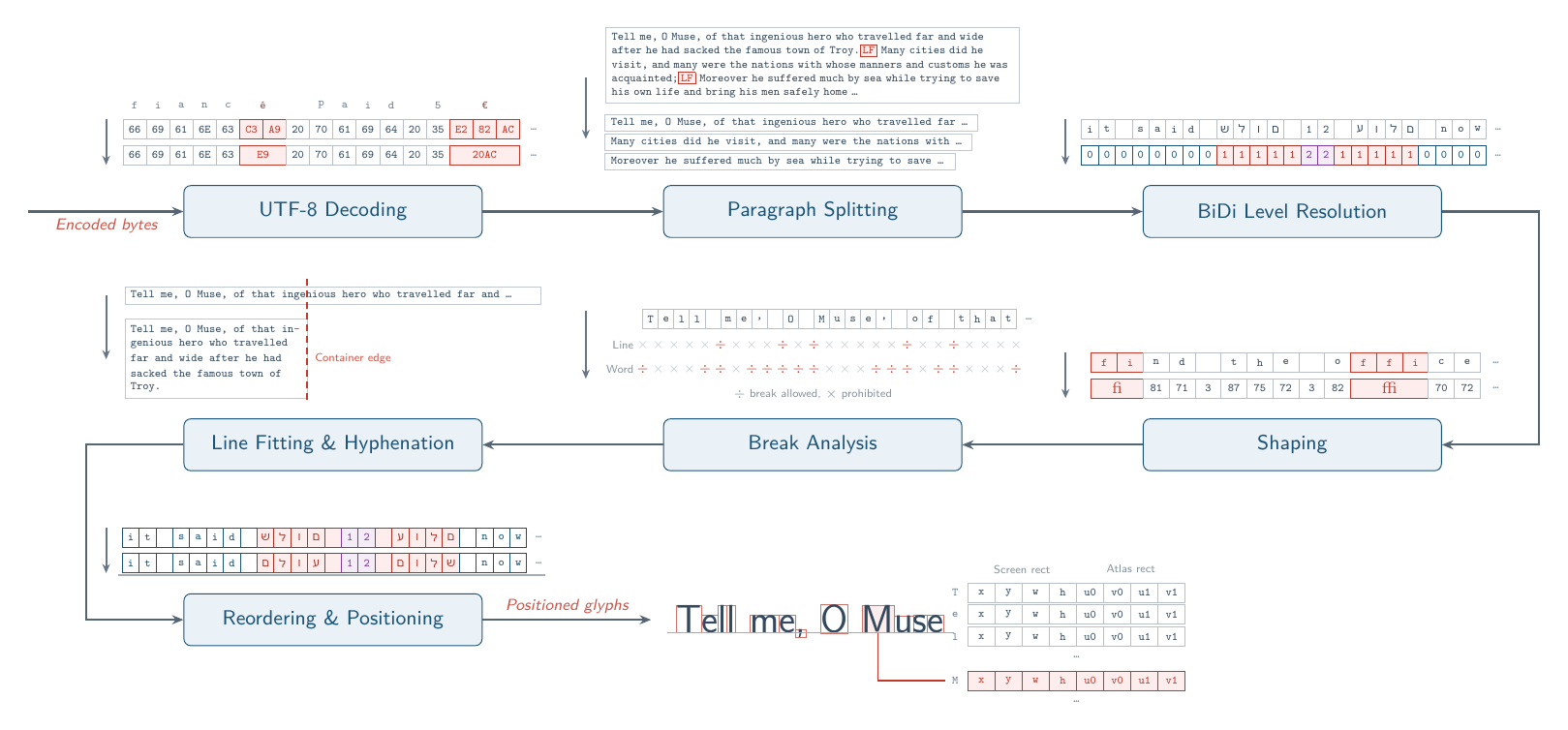
Text rendering is a major pain point while developing UIs or editors for graphics applications. Moving beyond simple monospaced, single-line ASCII text can be incredibly complicated. This article attempts to document the sequence of steps to go from an array of Unicode text data to letter shapes on screen as simply as possible. I’ll use lexkit, a text layout library I wrote, as a point of reference throughout. We’ll cover different encoding schemes, Bidirectional (BiDi) text, Unicode-compliant line and word breaking algorithms, hyphenation schemes and more.
Table of Contents
Rendering Text
Fonts can be thought of as collections of Glyphs: symbols that represent the letters, numbers and other symbols in the font’s typeface. Glyphs are typically described as vectors, i.e. lists of resizable shapes and lines that can losslessly scale to arbitrary sizes. They also contain important metrics about the dimensions they occupy on screen, key of which is the x-advance or amount by which a cursor should move forward after displaying the glyph at its current location. [1]
The problem we are going to solve in this post is of the following form. We have as input:
- A buffer containing text data.
- A font, style (bold, italic, etc.) and size we want to use.
- The language the text is written in, which a few later stages depend on.
- A window or subregion of a window we want to render that text into.
The desired output of this text layout system is a list of glyph indices along with the coordinates, height and width they occupy on screen.
There are three primary ways to draw a glyph to screen:
- We can preprocess the font to a texture that contains all glyphs in the font sizes and styles we desire. This texture is typically called a font atlas, and resembles other texture atlases common in graphics programming, e.g. the shadow map atlas. Then, we can translate a glyph index to the texture space rectangle (uv-extent of the glyph in the atlas), and blit it to the screen-space rect outputted by our text layout system. This is typically referred to as bitmap text rendering.
- We can store a signed distance field in the atlas instead of the rasterized glyph. In this scenario, each texel in the atlas stores how far it lies from the nearest glyph edge, and whether it falls inside or outside the glyph by its sign. This can be rendered by applying a threshold to this distance in a shader, which lets an atlas serve multiple font sizes. [2]
- Finally, we can just render the text to screen directly by drawing the vector shapes in the size and position described by the text layout system. The Slug algorithm is a popular choice for this method. [3]
Text Encodings
ASCII text is easily represented in C as an array of 8-bit integers or chars. But what happens when we need to describe characters that don’t belong to the English language, emoji or other complex symbols? Unicode 16.0 defines over 150,000 unique characters, far beyond the maximum that can be represented by 8 bits. To represent this large space of potential symbols or codepoints in a byte-efficient manner we need an encoding scheme.
A simple way to extend out of ASCII into codepoints that require more than 8 bits is through the use of a variable-size encoding scheme, where a single codepoint is represented by one or more chars. We split the bit sequence between multiple bytes and use a special header in the first byte indicating how long the sequence is. Finally we mark up the trailing bytes with the 10 prefix so that we know which bytes are part of the same codepoint. This is called UTF-8.
| Codepoint range | Bytes | Encoding |
|---|---|---|
| U+0000 - U+007F | 1 | 0xxxxxxx |
| U+0080 - U+07FF | 2 | 110xxxxx 10xxxxxx |
| U+0800 - U+FFFF | 3 | 1110xxxx 10xxxxxx 10xxxxxx |
| U+10000 - U+10FFFF | 4 | 11110xxx 10xxxxxx 10xxxxxx 10xxxxxx |
We’re going to proceed with the assumption that we’re working with text encoded using UTF-8, which is by far the most common encoding scheme out there these days. It’s crucial to be aware of what input scheme you’re working with however, there are other common encodings out there and assuming the wrong encoding scheme can lead to unexpected results. For example, the Win32 API decided to use a 16-bit scheme decades ago, and has been stuck with that ever since. You can learn more about text encodings at [4]. Luckily, most OSes and text libraries provide API functions to translate between encodings.
Paragraph Splitting
Laying out a body of text can be thought of as a hierarchy where the top is your entire piece of encoded bytes and the bottom are the individual glyphs that make it up. Sequentially, we split the body into small chunks, each of which can be split into smaller chunks independently. The first level of this hierarchy is the paragraph level. While it may seem obvious that paragraphs can be split via typical line breaking characters like CR and LF, Unicode specifies a whole class of codepoints that break paragraphs, aptly named the Paragraph_Separator class. [5]
Bidirectional Text
English, Spanish, French and most other Western languages flow from Left-to-Right (LTR). This means that successive glyphs typically flow in that direction for text segments that are part of these languages. In contrast, languages like Arabic and Hebrew flow from Right-to-Left (RTL). Handling both directions, possibly mixed in a single text corpus, is called BiDi handling.
BiDi handling begins by assigning each codepoint a BiDi class: a Unicode property describing how that codepoint behaves directionally. [6] Codepoints can be strongly LTR, strongly RTL, a neutral character like a space or a bracket, and so on. The Unicode Bidirectional Algorithm [5] resolves these classes into an embedding level for every codepoint, an integer where even values run LTR and odd values run RTL. The paragraph then decomposes into BiDi runs: maximal sequences of consecutive codepoints that share a level.
Why isn’t this as simple as assigning each codepoint a direction and reordering them as such? Let’s look at a tricky sentence where an English phrase is quoted within a Hebrew sentence, and there is another RTL sequence within the English phrase.
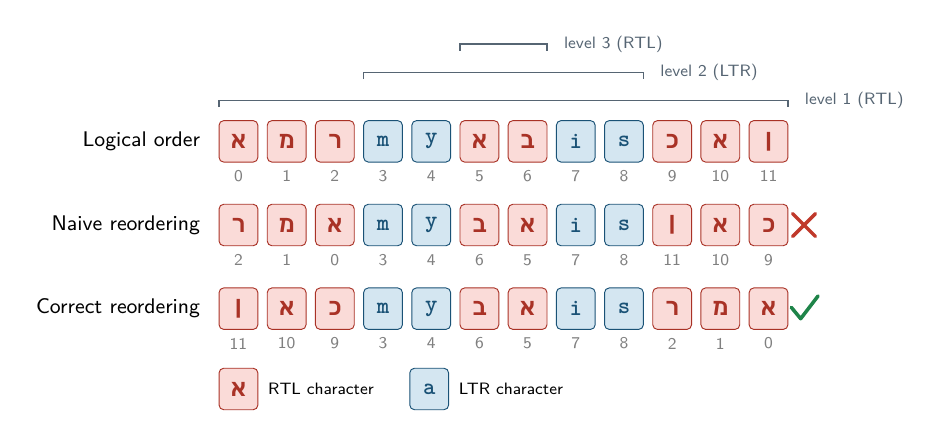
The naive approach ends up placing them in the wrong position. Correct reordering works from the deepest nesting level outward and is described in the Unicode Bidirectional Algorithm [5], under “Reordering Resolved Levels”. At each step we reverse every contiguous span of codepoints at that BiDi level or deeper, so a BiDi run at level i will be reversed i times.
Text Shaping
Text shaping refers to the process of converting a list of codepoints to a list of glyphs. This is a relatively complicated operation since the mapping runs in both directions: multiple codepoints may collapse into a single glyph (combining characters, ligatures, emoji sequences, etc.), and a single codepoint may expand into several glyphs. Additionally fonts may contain multiple glyph options for a single codepoint and the shaping engine needs to figure out which one from context. A font file’s Character to Glyph Index mapping table (cmap) supplies a default glyph for each codepoint. After that, two additional tables are used to perform contextual decisions. GSUB substitutes glyphs based on context (e.g. substituting consecutive glyphs with a ligature), and GPOS adjusts their positions relative to one another (e.g. for kerning). [7] HarfBuzz is generally recognized as the standard for text shaping engines and we use it for the shaping stage in lexkit. [8] We run it over each BiDi run individually since HarfBuzz exclusively handles shaping and isn’t able to perform other tasks in the pipeline such as BiDi handling or Line breaking.
This article is mainly concerned with rendering a single text block with a single font and style that is known ahead of time, which is more relevant for game UIs and graphics demos. It’s worth mentioning that applications like Web browsers and rich text editors have another level of hierarchy that we need to consider before shaping. Shaping engines work on a single script at a time, so a run spanning more than one script has to be split further. This means, for example, that English (Latin script) and Russian (Cyrillic script) can’t be part of the same shaping run despite both being left-to-right languages.
Additionally, shaping engines only work on a single font at a time, which means rich text editors must segment their text input according to font family, style and size. A robust application should also switch between fonts when the initial font is missing glyphs for some of the codepoints in the run, using a fallback font for that section of text. This additional decomposition before shaping is called itemization and is sufficiently complex to demand an article on its own. For our UI purposes, we can generally accept that we are dealing with a fixed number of fonts and styles and can assume that the text input is well-behaved, but for use cases where this isn’t true [9] is a good starting point for itemization.
Line, Word and Grapheme Breaks
Once we have our glyphs from the text shaping stage, we can work out how much space a piece of text occupies.
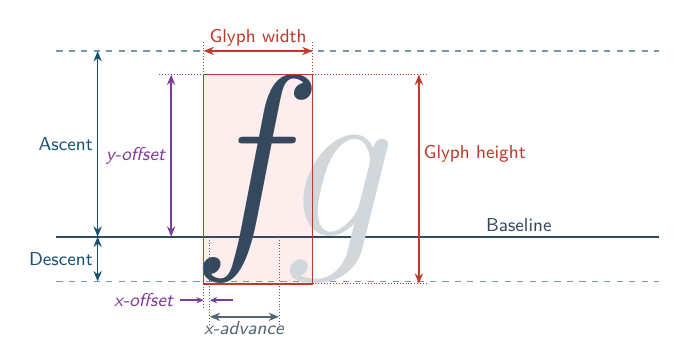
The shaping engine returns an x-advance and an offset for each glyph, which we accumulate to find how far the cursor travels along the line. The font atlas stores the dimensions of each glyph’s rasterized bitmap, describing the rendered symbol that actually appears on screen, which can extend past the glyph’s advance. Vertically, glyphs can be thought of as lying on a baseline, with a maximum extent above (the ascent of the font) and below (descent) which are specified in the font file and can be recorded as part of the Font Atlas. Additionally, a recommended distance between successive baselines is also recorded. Together, these metrics tell us the width and height a piece of text would occupy as a single line. Very useful in a UI setting where we might want to center it within another element, or grow a container to the size of text.
However, the most common way to render text is to a fixed-width container or window. In this case, we must automatically determine where to move on to the next line. This is called a Line break [10]. Following our hierarchical model of text rendering described earlier, we can think of each paragraph being decomposed into lines.
Unfortunately, this is not as easy as writing out glyphs until we exceed the line size for many reasons:
- It is difficult to read text that is broken up at a glyph level.
- Certain glyphs only read correctly when present consecutively, so they must not be broken between lines.
- It’s common to insert a hyphen to indicate a word is broken up between two lines, so we need to reserve space for the hyphen if we choose to break up a word.
- The cursor must change from LTR to RTL depending on the glyphs being rendered.
- There are certain glyphs that enforce a line break immediately after them.
The Unicode Line Breaking Algorithm [10] describes this process. The input to this algorithm is a single paragraph of codepoints and the output is a list of positions where a line break is required, optional or prohibited. It does this by mapping every codepoint in Unicode to a Line Breaking Class, then defines a set of rules about which kinds of breaks are permitted between which groups of classes. We will describe an efficient way of implementing this algorithm in a future optimization article.
We can then group glyphs into lines as follows:
- Use the Unicode Line Breaking Algorithm to determine a set of valid line break positions for the paragraph.
- Accumulate consecutive glyphs, adding up their x-advances until the sum exceeds the line width.
- Wind back to the previous valid line break position, and break there.
This is a greedy algorithm: every line is filled as far as it can be before we move on. To improve the evenness of line lengths, line breaking can additionally be performed on an entire paragraph at once, where candidate break locations are scored based on the gaps left behind. The Knuth-Plass line breaking algorithm used in TeX is the best example of this. [11]
Lines can be further broken down into words, and words can be similarly broken down into sequences of one or more codepoints called grapheme clusters [12].
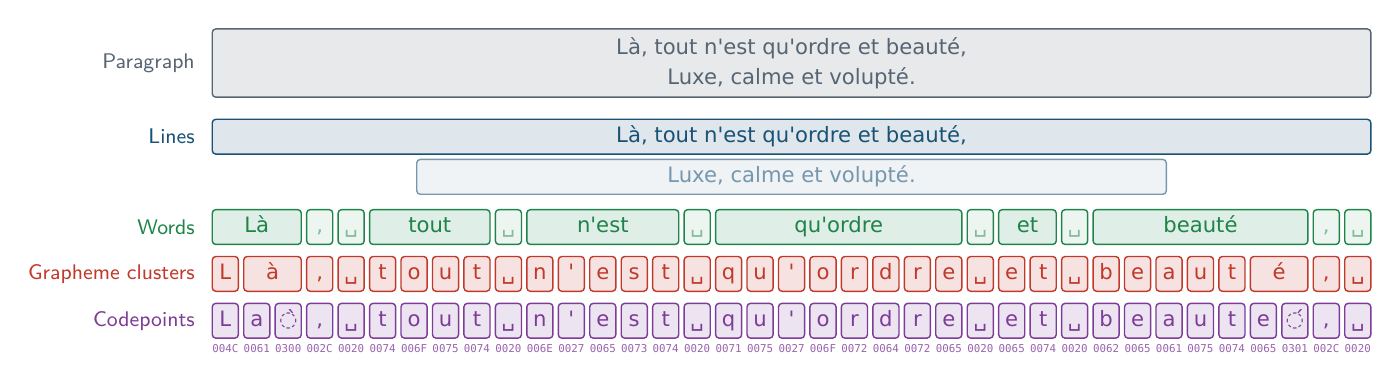
While grapheme clusters may look like a single character in most cases, they do not always map to a single codepoint. For example, an accented letter may be composed of a base letter codepoint followed by a combining mark codepoint representing the accent. Flag symbols are represented by pairs of regional indicator codepoints and complex emoji can be divided into multiple codepoints connected by special codepoints called zero width joiners.
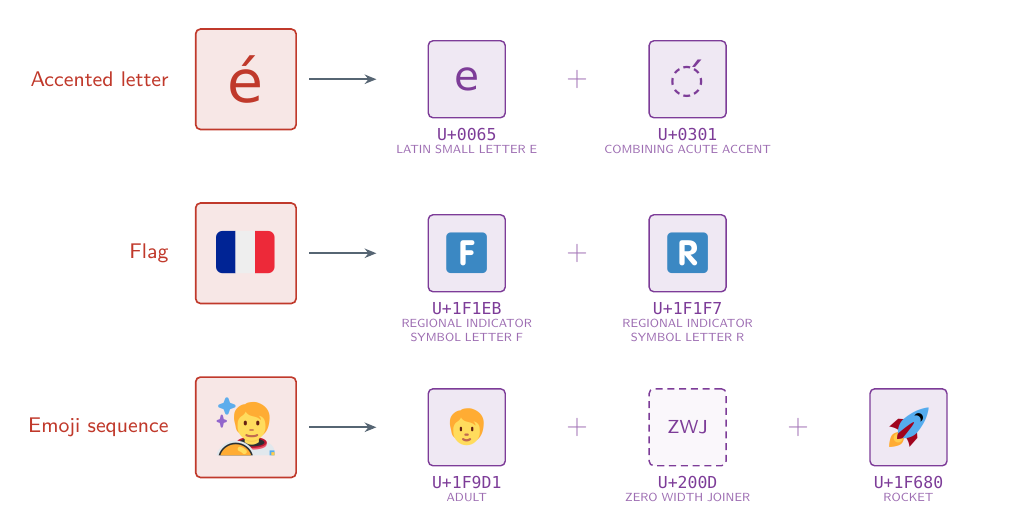
It makes no sense to break these codepoints up for line breaking or selection purposes. Grapheme clusters represent the lowest logical level of separation. Each of the above examples is a single grapheme cluster spanning several codepoints. The boundaries described by grapheme breaks are what a text editor uses to decide how far the cursor travels when you press an arrow key, or how much text a single backspace removes. Similar to line breaks, grapheme break locations are described by classifying codepoints into Grapheme Break Classes and specifying rules for legal breaks between them. [12]
Word breaks should be more intuitive. Pressing Ctrl + an arrow key advances the cursor forward or backward across word boundaries. In English, words are typically separated by spaces or other punctuation. Unicode’s Word Break Specification [12] again describes legal word break locations using a set of rules between Word Break Classes, where every Unicode codepoint maps to a class. If hyphenation is disabled, line break locations are also word break locations.
You may notice we described both line breaking and BiDi as operating on paragraphs instead of at two different levels in the hierarchy. This is because a single line can contain more than one directionality of text. So when accumulating x-advances for a line, we can do so freely across BiDi runs.
Hyphenation
What if we need to line break inside a word? In typical text layouts, this split is accompanied by a hyphen, and choosing an optimal break position within a word is called Hyphenation.
This can be a language-specific problem. TeX uses a dictionary of patterns per language to score every position in a word using Liang’s Algorithm. [13] This requires knowledge of the language used per section of text corpus as well as reliance on a fixed dictionary.
We use a simpler, greedy algorithm for lexkit. Since grapheme breaks already indicate which positions a word can be broken at without breaking things like emoji sequences, we call any break at a grapheme cluster boundary legal. Then we sweep over grapheme boundaries such that both the first half of the word and a hyphen fit on the original line, accounting for the kerning advance between the last glyph and the hyphen itself.
This approach needs no language-specific data at all, at the cost of breaking words at slightly less legible positions. For example, TeX implementations may favor breaking the word talking as talk- + ing, while our algorithm wouldn’t favor any specific position for that word.
Text Layout
Finally, we have a list of lines composed of glyphs, with each glyph belonging to a BiDi run. It’s here that we can apply the BiDi reordering algorithm described in the Bidirectional Text section, reorganizing the glyphs of a line into a left-to-right ordering regardless of the actual BiDi orientation.
Now we have the list of glyphs in visual order for this line and can lay them out. The cursor starts at the left edge of the line and moves forward by each glyph’s x-advance. Glyph metrics from the shaping stage specify the offset at which the glyph’s bitmap should be positioned relative to that cursor. Vertically, the first baseline of a text corpus sits one ascent below the top of our container, and each successive line moves the baseline down by the recommended distance between baselines. A glyph is then placed relative to its baseline using the extents recorded in the atlas. This gives us screen-space rects for every glyph, parameterized by x, y, height and width. From the font atlas, we retrieve a similar rect in UV space. Now text rendering reduces to a simple alpha-blended blit operation, highly efficient on the GPU.
References
[1] FreeType Glyph Conventions
[2] Chris Green, 2007. Improved Alpha-Tested Magnification for Vector Textures and Special Effects
[3] Eric Lengyel, 2017. GPU-Centered Font Rendering Directly from Glyph Outlines
[4] Joel Spolsky, 2003. The Absolute Minimum Every Software Developer Absolutely, Positively Must Know About Unicode and Character Sets (No Excuses!)
[5] Unicode Consortium. Unicode Standard Annex #9: Unicode Bidirectional Algorithm
[6] Unicode Consortium. Unicode Standard Annex #44: Unicode Character Database
[7] Microsoft. OpenType Specification
[8] HarfBuzz Manual
[9] Raph Levien, 2020. Text layout is a loose hierarchy of segmentation
[10] Unicode Consortium. Unicode Standard Annex #14: Unicode Line Breaking Algorithm
[11] Donald E. Knuth and Michael F. Plass, 1981. Breaking Paragraphs into Lines
[12] Unicode Consortium. Unicode Standard Annex #29: Unicode Text Segmentation
[13] Franklin Mark Liang, 1983. Word Hy-phen-a-tion by Com-put-er